Tuesday, January 6, 2015


Thursday, December 18, 2014

Thursday, December 11, 2014

Sunday, December 7, 2014
Nokia 1202 1280 Lcd And Keypad Light Solution

Nokia 1202 1280 Lcd And Keypad Light Solution
Nokia C2 03 Display Light Jumpers Ways Solution

Nokia C2-03 Lcd Light Jumpers Ways Solution
Nokia C2-03 Display Light Jumpers Ways Solution
Nokia C2-03 No Light Jumpers Ways Solution
Monday, November 24, 2014
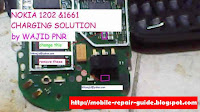
Nokia 1202 1661 Charging Problem Picture Help
In the previous post, mobile phone repair share for Nokia 1202 and Nokia 1661 test mode problem picture help. Now, still about these phone, the problem now is around charging process. We have four picture help that you can use as a guide to fix or repair your Nokia 1202 and Nokia 1661 charging problem.
 |  |
 |  |
Nokia 5130xpress music schematic
According to Mr. Pakars request, here Phone Repairing will share the Nokia 5130xpress music schematic diagram. The request is about keypad IC of Nokia 5130, but we give the schematic because with full schematic diagram, you can make an analysis more comprehensive.
The location of the keypad IC is as showed by the picture below :

There are two ICs ie. Z2401 and Z2402. The location is near the flasher cable interface as you can see from the picture above.
E71 nokia white screen done
E71 nokia white screen done status : white screen then blinking actiontaken : flash ko ang unit no lock, reheat rapido and flash, still no lock, alugin ang rapido ic done. screenshot : 

ReadMore..


Friday, November 21, 2014
Samsung S5830 Earpiece Speaker Problem Jumper solution

Samsung S5830 Earpiece Speaker Problem Jumper solution
SAMSUNG MOBILE SPEAKER JUMPER
Samsung S5830 Ear Speaker Jumper Ways
Samsung GT-S5830 Earpiece free-mobile-solutions
Not Working Solution
free-mobile-solutions
The solution for hardware level of repair for
Samsung GT-S5830 Earpiece Speaker Not Working
and Ringer is properly working
Samsung S5830 Speaker Ways and Jumpers
information For s5830 samsung mobile phone
free-mobile-solutions
Just see the solution preview below for it shows
which components needs to be check and replace if
the there is No Speaker Working
free-mobile-solutions
This solution may help if you already done a software
calibration method and tried replacing the Speaker or
Ringer but the problem continues.
free-mobile-solutions
The solution step by step.
free-mobile-solutions
This solution may help for a water damaged and
accidentally, heavily dropped phones. Any chemical
free-mobile-solutions
The Problem occur because of faulty Speaker
bad it’s connection to the Mobile Phone’s PCBA
Main Board
free-mobile-solutions
You Can Use any cleaning liquid for this purpose
like AC TON or any other you prefer.
free-mobile-solutions
This is the Solution for Samsung S5830 Speaker or
Ringer Problem Ways.
How to Get Samsung’s LG’s Best Exclusive Features on Any Android Phone
Everyone wants a high-end smartphone that comes equipped with unique features, such as Samsung galaxy s3’s Smart Stay feature which will not let the Lcd turns black as long as you’re staring at the Lcd. LG Optimus handset lets you run apps in tiny windows on top of the desktop, while Motorola RAZR devices can perform key tasks according to a schedule. These features are really innovative.
 Fortunately, you don’t need to buy a particular brand of phone to get an enhanced Android experience. There are a number of third-party apps available through the Google Play store can replicate the best custom features that Samsung, LG, HTC and Motorola have to offer.
 Samsung Pop-Up Play/ LG QSlide Alternatives
LG’s QSlide feature lets you put one or two small windows on top of your work running the browser, video player or calculator apps. Samsung’s Pop up play is the ability to watch video at the same time as you text, email, browse the web or do just about anything else on your phone.Alternative Apps: There are a lot of third-party floating apps in Android Market that will put windows on top of your work even though it is not as attractive as QSlide or Pop-up Play. Floating Browser Flux is a resizable browser in a window that has tabs and can be activated from the notification drawer. Super Video, Floating & Popup plays local video files in a window and support re-size, move window, two multi-windows play-back, while Floating YouTube plays streaming videos.Floating Mail and Floating Chat promise the ability to put email or IMs on top of your work, but neither app was able to connect to our accounts. AirCalc provides a floating calculator, complete with a see-through Lcd. Unfortunately, none of these floating apps allow you to adjust transparency like the LG and Samsung solutions do. Samsung Smart Stay Alternatives
It is really annoying when you’re reading something intently on your phone and suddenly the Lcd turns black and goes to sleep because you haven’t tapped the glass in a while? Samsung’s Smart Stay feature uses your phone’s webcam to determine that you’re still staring at the Lcd and reset its timeout.Alternative: The app called SmartStay Ex provides the same functionality, with more options than Samsung offers. SmartStay Ex keeps your Lcd from turning off while you are using it by scans the front camera for faces at regular intervals. If a face is found, it will keep the Lcd from turning off. There are many advanced options available and many more planned!Samsung Motion Gesture Alternatives
Samsung provides an easy way to deny an incoming call by just flipping the phone over to silence it. Other Samsung motions include Direct Call, which starts dialing the phone number of a contact as soon as you lift the phone to your ear.
 Alternatives: Flip Silent is a very simple free app that silences your ringer as soon as you flip your phone over in either direction. Easy Answer, which is also free, provides a host of other motion control features, including the ability to answer the phone by lifting it to your ear. However, if you want to silence a call in Easy Answer, you’ll have to shake the phone rather than turning it over.HTC People Widget Alternatives
One of the more attractive features of HTC’s Sense UI is its optional People Widget, which displays social updates from your friends right on your device. There are several free alternatives in the Google Play Market.
 Alternatives: Taptu allows you to create custom widgets with streams from Facebook, Twitter and various news feeds. BlingBoard also provides an attractive 4 x 4 widget with Facebook, Gmail and Twitter updates, along with missed calls and SMS messages.LG QuickMemo/Samsung S Pen Easy Clip Alternative
Both LG and Samsung provide the ability to take Lcdshots, draw on them with your stylus or finger and share them. LG’s QuickMemo stands out, because it lets you scribble a note on top of the Lcd (example: “Buy milk”) and keep them there even as you continue to use your desktop and apps below.
 Alternative App: Floating Draw lets you scribble on your Lcd and either save the results as an image file or leave your drawing as a layer on top of the Lcd as you continue to use your phone. When running, the free app puts a small pen icon in the lower right corner of your Lcd. Just tap it, and you’re ready to scribble.
LG Live Zoom Alternative
Even the largest phones only provide between 5 and 6 inches of Lcd for watching HD movies. So what if you want to get a closer look at the skier slaloming down the middle of the display rather than seeing the whole mountain? LG’s Live Zoom feature lets you pinch-to-zoom in on offline videos just like you can for Web pages and photos.
 Alternatives: BSPlayer Free also lets you pinch-to-zoom in and out on offline videos. Like Super Video, the free app can also float its video player on top of other apps. The app even supports gesture controls and Lcdshot captures from within a video.LG QTranslator Alternative
LG’s QTranslator app can convert foreign language writing to English (or your native tongue) in real- time via the device’s camera. More advanced than Google Translate.
 Alternative App: CamDictionary also allows you to translate words in real- time just by rolling your phone over them. Available in a free trial version that unlocks more vocabulary features for $1.99, the app also has several downloadable offline dictionaries that can translate text even when you don’t have an Internet connection.Motorola Smart Actions Alternatives
Motorola Mobility may not get any love from Google, but we’ve always been fond of the Smart Actions phone automation app Moto puts on its RAZR phones. Using Smart Actions, we’ve been able to configure our phone to automatically go into silent mode when we’re in a meeting or stop syncing data at night when we want to save data.
 Alternatives:For$6.49, Tasker allows you to schedule changes to your phone based on your calendar, time of day or location with a much attractive UI.
ReadMore..
LG’s QSlide feature lets you put one or two small windows on top of your work running the browser, video player or calculator apps. Samsung’s Pop up play is the ability to watch video at the same time as you text, email, browse the web or do just about anything else on your phone.Alternative Apps: There are a lot of third-party floating apps in Android Market that will put windows on top of your work even though it is not as attractive as QSlide or Pop-up Play. Floating Browser Flux is a resizable browser in a window that has tabs and can be activated from the notification drawer. Super Video, Floating & Popup plays local video files in a window and support re-size, move window, two multi-windows play-back, while Floating YouTube plays streaming videos.Floating Mail and Floating Chat promise the ability to put email or IMs on top of your work, but neither app was able to connect to our accounts. AirCalc provides a floating calculator, complete with a see-through Lcd. Unfortunately, none of these floating apps allow you to adjust transparency like the LG and Samsung solutions do.
It is really annoying when you’re reading something intently on your phone and suddenly the Lcd turns black and goes to sleep because you haven’t tapped the glass in a while? Samsung’s Smart Stay feature uses your phone’s webcam to determine that you’re still staring at the Lcd and reset its timeout.Alternative: The app called SmartStay Ex provides the same functionality, with more options than Samsung offers. SmartStay Ex keeps your Lcd from turning off while you are using it by scans the front camera for faces at regular intervals. If a face is found, it will keep the Lcd from turning off. There are many advanced options available and many more planned!Samsung Motion Gesture Alternatives
Samsung provides an easy way to deny an incoming call by just flipping the phone over to silence it. Other Samsung motions include Direct Call, which starts dialing the phone number of a contact as soon as you lift the phone to your ear.
One of the more attractive features of HTC’s Sense UI is its optional People Widget, which displays social updates from your friends right on your device. There are several free alternatives in the Google Play Market.
Both LG and Samsung provide the ability to take Lcdshots, draw on them with your stylus or finger and share them. LG’s QuickMemo stands out, because it lets you scribble a note on top of the Lcd (example: “Buy milk”) and keep them there even as you continue to use your desktop and apps below.
Even the largest phones only provide between 5 and 6 inches of Lcd for watching HD movies. So what if you want to get a closer look at the skier slaloming down the middle of the display rather than seeing the whole mountain? LG’s Live Zoom feature lets you pinch-to-zoom in on offline videos just like you can for Web pages and photos.
LG’s QTranslator app can convert foreign language writing to English (or your native tongue) in real- time via the device’s camera. More advanced than Google Translate.
Motorola Mobility may not get any love from Google, but we’ve always been fond of the Smart Actions phone automation app Moto puts on its RAZR phones. Using Smart Actions, we’ve been able to configure our phone to automatically go into silent mode when we’re in a meeting or stop syncing data at night when we want to save data.
Thursday, November 20, 2014

How to Install Android v4 4 4 KitKat CandyKat Custom ROM on Google Nexus 5 full Tutorial
Google Nexus devices ( Credit: Telemeen Team)
Six Steps Prerequisite (things to remember before the installation of custom ROM in the smartphone):
- Although installing custom ROM improves the devices overall performance and UI activities, it makes the business warranty void and they will no longer be prone to provide updates in future (Users could restore warranty by flashing the product with stock-ROM).
- This Android v4. 4. 4 KitKat CandyKat personalized ROM has to be fitted just on Google-LG Nexus 5 Style (To check your model: Go to Settings >> About phone >> model number)
- You must rooted the phone first.
- For Installing of custom ROM needs to clear of whole data within your smartphone, So ensure that you back up your all the data by the help of Clockwork Mod. [CWM] Recovery/ TWRP in the smartphone.
- Now youve to make sure that your USB drivers is installed in the PC, or else the phone (Google-LG Nexus 5 model) wont recognize by your Personal Computer, Laptop or Whatever you use.
- The very last step is to make sure your device has little more than 80 percent battery power, or else there exists chances of getting bricked just for temporarily not to worry thats because if the installation process interrupt.
The brand new custom ROM -CandyKat- is considered to be based on v4.4.4 KitKat OS and is comes with lots of modification options.
The most beneficial Twelve(12) I mention here :
- Completely new hardware switch settings.
- Candy sweetener themes and mods
- Google ID dialer
- Dark themed UI
- Slim Pie
- Custom carrier label
- Custom candy images
- New battery icons
- New LockScreen themes
- Hover feature
- Custom toast animations
- Performance tweaks and many more improvements to enhance user-experience
[Disclaimer: This process is very technical and a person who is actually good with rooting have to perform this sound familiarity [or manual software installation] in all the Android devices.
Be Aware!! If the installation process is not followed step by step properly, there will be more chances of the smartphone getting bricked.
You can find in International Business Times, India Edition wont take any responsibility for almost any claims or damage if the procedure does not yield the satisfied results or in the event that smartphones get bricked. (Hence users advised to proceed with caution.)
Step-by-step ROM Google-LG Nexus 5 set up procedure of Android v4. 4. 4 KitKat CandyKat:
Step 1: Android v4. 4. 4 KitKat CandyKat Custom made ROM Download (HERE) also with Google Apps (HERE) in the PC.
Step 2: Connect Google LG Nexus 5 in order to PC via UNIVERSAL SERIAL BUS (USB) cord.
[Note: Before plugging the device to the laptop or computer, make sure you might have installed USB drivers software, if not necessarily, click Here in order to download the firmware]
Step 3: After that, place Android v4. 4. 4 KitKat Custom ROM zip file as well as the Google Apps. zip file to the phones SD card memory. [Note: We Advised users to paste the. zip files inside SD card root menu, not in any other folder]
[Note: Before Users start installing the actual software, Do make sure the device is already rooted and ClockworkMod Recovery is installed perfectly]
Step 4: Now turn-off your cell and disconnect it from the PC.
Step 5: Now perform the standard [Boot-loader] Mode sortie, by means of pressing volume up and volume down and power buttons at the same time.
Step 6: The moment performing the (Bootloader mode) go to ClockworkMod Recovery mode then perform whole data wipe, by choosing wipe data/factory reset [Note: Use volume keys to navigate along with power button to pick options, while working is under Recovery Mode].
Step 7: Then, Youve to clear the cache memory by selecting "wipe cache partition."
Step 8: When you are performing the (Bootloader mode) go back to ClockworkMod Recovery mode then perform whole data wipe, by choosing wipe data/factory reset [Note: Use volume keys to navigate along with power button to pick options, while working is under Recovery Mode]
Step 9: Then, come back to the main recovery screen and then tap on install zip from SD card.
Step 10: Next tap choose zip from sd-card and go to Android 4. 4. 4 ROM zip file in Sd card and enter the actual installation process. Do the same procedure for installing Google Apps. [Note: Use volume tips to navigate and also power button to pick out options].
Step 11: Once carried out with the installation method, navigate to +++++Go Back+++++ and re-start your phone by opting "reboot system now".
Now, your phone "Google-LG Nexus 5" will take at least five minutes to finish the booting method.
Users, then head to Settings >> select About phone to confirm the installation of Android v4. 4. 4 KitKat CandyKat Custom ROM.
xolo a500 hard reset pattern lock

xolo a500 hard reset
Power off the phone
volume down + power switch
In the recovery menu select wipe
data factory reset with Volume
button. Press power to confirm.
After hard reset completed,
select reeboot system now!
All data will be lost!

Wednesday, November 19, 2014
HTC One X How To Change Font Without Root
Using a gadget that has the android operating system already familiar to most communities across the country . nah talking about the operating system which is owned by the worlds best search engine google.com the we feel bored when using the app or view the existing standard in the OS .
Display is one of the important role that must exist on the operating system and therefore the author will try to share about how to change the font andoid course that we do not feel bored when using the gadgets that we have and can change the look according to our desires , how to change the font HTC One X have several ways but here Ill share that in the type for HTC One X according to the author is doing .
sometimes to make changes to the appearance of the android system we have to ROOT the phone while if the phone is already in the root then the warranty will be forfeited , if unfortunately it still has a warranty but already in the root and therefore the author will give solusion .
the following steps:
first
Please download the font used on the link below Android Changing the font
then simply extract the rar file and input into your mobile phone and do the installation .
So easy is not the way to change the font in android hopefully useful if you are not clear please do comment on the post below thanks .
ReadMore..
Display is one of the important role that must exist on the operating system and therefore the author will try to share about how to change the font andoid course that we do not feel bored when using the gadgets that we have and can change the look according to our desires , how to change the font HTC One X have several ways but here Ill share that in the type for HTC One X according to the author is doing .
sometimes to make changes to the appearance of the android system we have to ROOT the phone while if the phone is already in the root then the warranty will be forfeited , if unfortunately it still has a warranty but already in the root and therefore the author will give solusion .
the following steps:
first
Please download the font used on the link below Android Changing the font
then simply extract the rar file and input into your mobile phone and do the installation .
So easy is not the way to change the font in android hopefully useful if you are not clear please do comment on the post below thanks .
Samsung C3010S Mic Not Working Solutions Jumpers

Samsung C3010S Mic Not Working Solutions Jumpers
Samsung C3010S Mic Not Working Solutions
Samsung C3010S Mic Not Working Problem
Samsung C3010S Mic Not Working Solutions
Samsung C3010S Mic Not Working Problem
iPhone Auto On When Battery Inserted Problem solution

This is the solution for iPhone auto on when we insert the battery.
carefully try the solution given in diagram . Hope it will work 100 %.
Tuesday, November 18, 2014
HTC One X How To Changing Application At Bottom Dock
HTC One X homeLcd always consists of wallpaper that you can set yourself , you can select the widget and install , the app icon you can choose to show , and the "bottom dock " which by default contains 3 application is " Phone " , " Messaging " , " Contacts " , and a button to open the " app drawer " or return to " Home " .
However , did you know that 3 applications at the "bottom dock " ie " Phone " , " Messaging " , " Contacts " can be replaced with other applications
Settings to customize the shortcut on the "bottom dock " clearly does not look like the way the other settings on the homeLcd , but HOCSmile found that the application of the "bottom dock " This can be customized . The following are the steps for replacing Bottom Dock HTC One X apps :
1 . Open the " app drawer " by clicking the icon on the "bottom dock" .
2 . Click the button that will display the options menu " Edit" .
3 . Click the " Edit " .
4 . Select an application in the " app drawer " , Press and hold until it vibrates , then drag the application to the "bottom dock" .
Bottom Dock HTC One X Preview
Bottom dock can only accommodate a maximum of 4 icon . So in this way , you can only replace 3 existing applications with bottom dock application of your choice . Applications you selected will disappear from the app drawer and move to the bottom dock , while the application of the bottom dock will move on to the app drawer . While the button to open the " app drawer " or return to " Home " can not be replaced . Good luck !
ReadMore..
However , did you know that 3 applications at the "bottom dock " ie " Phone " , " Messaging " , " Contacts " can be replaced with other applications
Settings to customize the shortcut on the "bottom dock " clearly does not look like the way the other settings on the homeLcd , but HOCSmile found that the application of the "bottom dock " This can be customized . The following are the steps for replacing Bottom Dock HTC One X apps :
1 . Open the " app drawer " by clicking the icon on the "bottom dock" .
2 . Click the button that will display the options menu " Edit" .
3 . Click the " Edit " .
4 . Select an application in the " app drawer " , Press and hold until it vibrates , then drag the application to the "bottom dock" .
Bottom Dock HTC One X Preview
Bottom dock can only accommodate a maximum of 4 icon . So in this way , you can only replace 3 existing applications with bottom dock application of your choice . Applications you selected will disappear from the app drawer and move to the bottom dock , while the application of the bottom dock will move on to the app drawer . While the button to open the " app drawer " or return to " Home " can not be replaced . Good luck !
Samsung Galaxy S3 Mini Value Edition GT I8200L How to Install I8200LUBUANB2 Android 4 2 2 Jelly Bean Firmware
How to Install Android 4.2.2 Jelly Bean Official Firmware on Galaxy S3 Mini I8200L through Odin:
ReadMore..
- Download Android 4.2.2 UBUANB2 Firmware for Galaxy S3 Mini I8200L from the above list
- Download Odin 3.09
- Switch off your phone and boot Galaxy S3 Mini I8200L into Download Mode by pressing and holding the Volume Down+Home+Power buttons (long press until the boot Lcd appear), now press Volume Up key to proceed to Download Mode.
- Extract the downloaded Odin3.09 zip file and run the Odin3 v3.09.exe file as an administrator (Right click on the .exe file and click on Run as administrator)
- Now connect your Galaxy S3 Mini I8200L to your computer via USB cable
- In Odin3 Lcd, you should see a COM Port number like “0:[COM7]” at ID:COM section and “Added!” text at the message box. This means your device has been detected by Odin3.
- Make sure that, only the “Auto Reboot” and “F. Reset Time” options are checked.
- Now, extract the downloaded firmware zip file, you’ll find a firmware file with extension .tar.md5
- In Odin Lcd, click on AP button and select the firmware file with .tar.md5 extension (The firmware file look something like: I8200LXXDLJ5_I8200LODDDLI7_INU.tar.md5)
- Now, click on the Start button to begin the installation process, wait few moments.
- Once completed, you would see “PASS!” message in ID:COM port having green background
- Your phone should automatically reboot after completion
- You can now disconnect your phone from computer
Subscribe to:
Posts (Atom)
