Showing posts with label 600. Show all posts
Showing posts with label 600. Show all posts
Thursday, September 25, 2014
HTC Desire 600 dual sim Factory data reset
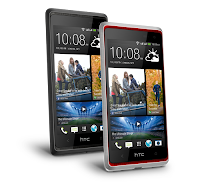
How to perform soft reset and hard reset ( master reset ) HTC Desire 600 dual sim via Settings menu and External hardware keys:
Hard reset via Settings menu
- Slide the Notifications panel open, and then tap Settings
- Tap Backup & reset.
- Tap Reset phone.
- If you also want to delete media and other data on HTC Desire 600, select Erase
- all data.
- Tap OK.
To avoid permanent damage to your device, do not restart your device while a reset procedure is underway.
Warning! All data will be erased from device memory, including system and application data, settings and downloaded applications. Back up your important data. The device will restore to factory settings.
Hard reset via external hardware keys
- Remove the battery, wait for a few seconds, then reinsert the battery.
- Press and hold the VOLUME DOWN button, and then press and hold the POWER button.
- Wait for the Lcd with the three Android images to appear, and then release the POWER and VOLUME DOWN buttons.
- Press VOLUME DOWN to select FACTORY RESET, and then press the POWER button.
Only do this if you can not do it via Setting menu.
Performing Soft Reset
- If the display is off, press the POWER button to turn it back on.
- Unlock the display.
- Press and hold the POWER button, and then tap Restart.
- When asked to confirm, tap Restart.

Wednesday, September 24, 2014
Hard Reset Garmin Nuvi 600 series to Factory default settings
| Hard Reset Garmin Nuvi 600 series to Factory default settings |
Performing a master reset Garmin Nuvi 600 to Factory default settings. It will erase all data and also all entered truck profiles:
- Turn power Off and unplugged from power
- Touch and hold the lower right corner of the Lcd with an index finger or the eraser end of a pencil
- Continue touching and holding the lower right hand corner of the Lcd then power the device ON
- Release the power button when the device powers ON
- You will see a new message: “Do you really want to erase all user data?”
- Remove your finger from the touch Lcd when this message displays
- Touch Yes
If text language is not in English, this is the button on the right
The device will now reset. Follow the on-Lcd prompts and then place your device in an area with a clear view of the sky until it acquires satellites.
Subscribe to:
Posts (Atom)
